




1. Home
  2. Instagram story templates
  3. Monthly Recap

Monthly Recap Instagram story templates

Sum up your month in one story – the “September dump” format with the month name stacked over your photos. 5 free monthly recap Instagram story templates. Add your photos in the Allapulla app and share a 1080×1920 story in seconds.

The month dump, ready in a minute

The month dump is one of the most repeated story formats on Instagram: at the start of every month, a few photos from the last one with the month’s name written big. It works because it doesn’t need a special event – an ordinary month is the whole point.

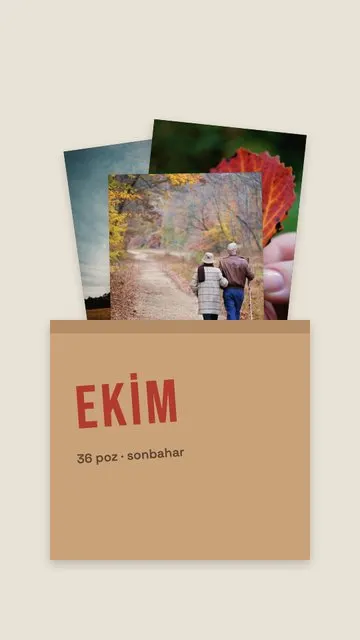
The templates in this category are built for exactly that format. Each one shows “October” as an example; you just type your own month.

  • October Reel (5 photos). Photos in a row like frames from a reel – good for a month with lots of small moments.
  • October Dump (5 or 4 photos). Two classic dump layouts with the month name over the photos, one for five photos and one for four.
  • October Minis (5 photos). Five small frames for details – a coffee, a ticket, a shadow, a plate, a face.
  • October Prints (3 photos). Three photos like prints slipped into an envelope, for a quieter month.

How to make a monthly recap story

  1. Pick 3–5 photos from the month in Allapulla. Only templates for that number appear.
  2. Open Monthly Recap and choose a template; the photos drop in automatically.
  3. Move or zoom each photo so the main detail stays visible.
  4. Replace “October” with your month and share to your story.

Choosing the photos

  • Go through the month week by week and take one photo from each week.
  • Mix one face, one place, one detail and one candid moment.
  • Don’t wait for perfect photos – blurry nights and messy tables are what make a dump feel real.
  • Post it in the first few days of the new month, while people are still sharing theirs.

More tips in how to make a photo dump story and how to put multiple photos in one Instagram story.

Frequently asked questions

What is a monthly dump on Instagram?

A monthly dump is a story or post that collects the best and most ordinary moments of one month – coffees, nights out, views, faces – with the month’s name on top, like “October dump”. It is usually posted in the first days of the next month.

How do I make a monthly recap story?

Pick 3–5 photos from the month in Allapulla, open Monthly Recap, choose a template and type the month’s name over the example text. The photos are placed automatically, and you can share the 1080×1920 story straight to Instagram Stories.

Can I change the month name on the template?

Yes. The templates are shown with “October”, but the month word is editable text, so you can write any month – or something like “Summer” or “2026”.

How many photos should a monthly recap have?

Three to five. The Monthly Recap templates are made for exactly that – October Prints holds three, one October Dump layout holds four, and October Reel, October Minis and the other October Dump hold five.

Monthly Recap Instagram story templates

Pick your photos and get Instagram story templates that fit them. New designs every week, all free.

Browse by category

Photo Dump · Birthday · Love · Travel · Minimal · Magazine & Film · Scrapbook · Friends & Family · Food · Business · Wedding · Quotes · Seasons · Sport · Special Days · Fun